Big Files Don't Belong in Your Database
Object Storage
Blob/object stores (S3-style) for media and files, buckets and durability, and presigned URLs for direct client upload and download.
What you'll learn
- Decide when media belongs in object storage instead of a database
- Explain buckets, objects, and the durability model
- Use presigned URLs to upload and download directly from the client
Back in the estimation lesson, the moment we added media to the Twitter math, the storage number exploded and we noted media needs a separate path from text. This is that path: object storage — S3, Google Cloud Storage, Azure Blob, Cloudflare R2 — the right home for images, video, PDFs, backups, and any large binary blob.
The rule is blunt: never store large files in your primary database. A 50 MB video in a Postgres row bloats every backup, blows up your row size, slows queries, and wastes expensive transactional storage on bytes that need none of its guarantees.
What object storage is
An object store is a flat namespace of objects (the file’s bytes plus metadata) grouped into buckets and addressed by a key (a string that looks like a path but is really just an opaque id). It’s essentially a giant, internet-scale key-value store specialized for big immutable blobs.
What you get, and why it beats a database for this job:
- Effectively infinite, cheap capacity — pay per GB, scale without thinking.
- Extreme durability — providers replicate across devices and data centers, advertising “eleven nines” (99.999999999%) — losing an object is astronomically unlikely.
- HTTP-native — every object has a URL; pair it with a CDN and you serve media from the edge.
- No event-loop risk — bytes never stream through your Node process (more on that below).
The tradeoffs: objects are typically immutable (you replace, not edit in place), there are no queries (you look up by key — list operations are limited and slow). Historically some stores served reads with eventual consistency, though S3 now provides strong read-after-write consistency.
The pattern: keep the blob out, keep a pointer in
You don’t choose database or object storage — you use both. The bytes live in the object store; a row in your database holds the metadata and the object’s key. The database stays small and queryable; the blobs scale independently.
| Goes in the database | Goes in object storage |
|---|---|
id, userId, filename | the actual file bytes |
contentType, sizeBytes | the image / video / PDF |
bucket, objectKey | (referenced by that key) |
createdAt, permissions | — |
Presigned URLs: don’t proxy the bytes
The naive upload flow routes the file through your server: client → app server → object store. That’s wasteful and, in Node, dangerous — a fleet of large uploads streaming through your event loop ties up memory and connections.
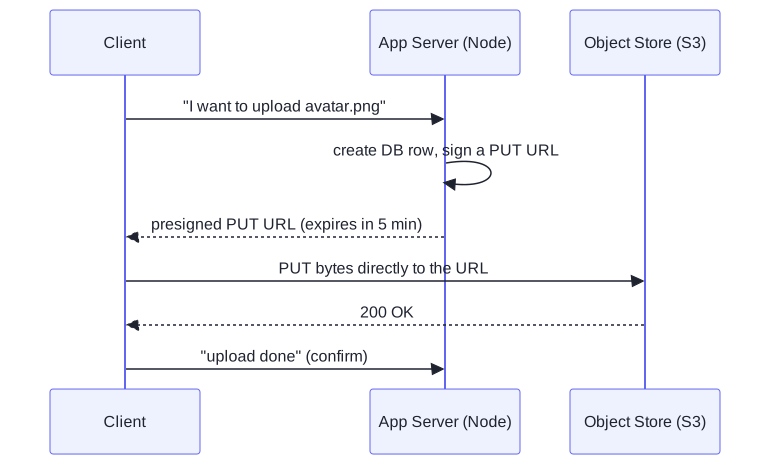
The right pattern is the presigned URL. Your server, which holds the cloud
credentials, generates a short-lived, cryptographically signed URL granting
permission to PUT (upload) or GET (download) one specific object. The
client then talks directly to the object store with that URL — the bytes never
touch your server.
Downloads work the same way with a signed GET URL — perfect for private files
(you authorize per request, the URL expires) while public assets can just sit
behind a CDN.
The JavaScript angle
Generating a presigned URL in Node is a few lines with the AWS SDK — and notice what the server is not doing: it never reads or buffers the file. It signs a permission and hands it off.
import { S3Client, PutObjectCommand } from '@aws-sdk/client-s3';
import { getSignedUrl } from '@aws-sdk/s3-request-presigner';
import { randomUUID } from 'node:crypto';

const s3 = new S3Client({ region: 'us-east-1' });

// Server endpoint: mint a short-lived URL for ONE object, then return it.
app.post('/uploads', async (req, res) => {
  const key = `avatars/${req.user.id}/${randomUUID()}.png`;

  // Persist the pointer in your DB now; the bytes will arrive at the store.
  await db.query(
    'INSERT INTO files (user_id, bucket, object_key, status) VALUES ($1, $2, $3, $4)',
    [req.user.id, 'my-app-media', key, 'pending'],
  );

  const url = await getSignedUrl(
    s3,
    new PutObjectCommand({ Bucket: 'my-app-media', Key: key, ContentType: 'image/png' }),
    { expiresIn: 300 },           // 5-minute grant, then the URL is dead
  );

  res.json({ uploadUrl: url, key }); // client PUTs directly to S3 — bytes skip us
});The client PUTs the file straight to S3 with that URL, then pings your server to
flip the row from pending to ready. Your Node process moved metadata, never
megabytes — exactly the discipline the event-loop lesson preached.
That completes the data layer: how to choose, model, index, replicate, shard, and reason about the consistency of your stores — and where to put the bytes that don’t belong in them. Next we leave storage and move to how services talk: network protocols.